Keybindings
Keyboard shortcuts for the TUI.
Passthrough mode
When attached, your terminal is in raw passthrough mode: all input goes straight to the agent’s PTY unless the prefix key intercepts it.
When updating from older builds, migrate keybindings.session_list to
keybindings.session_navigator and [keybindings.overlay] to
[keybindings.tui]. The old names are ignored; gr doctor reports them with
the new names.
Prefix key
Default ctrl+b, configurable via keybindings.prefix.
Press the prefix key to show a help bar at the bottom of the screen (it clears
after the next keypress), then press one of these. Each key is configurable via
the matching keybindings.* field (defaults shown). Prefix-command keys must be
exactly one printable ASCII byte; empty strings, multi-character values,
multi-byte text, and NUL are rejected at config load.
| Key | Action | Config key |
|---|---|---|
w | Open the Session Navigator | session_navigator |
d | Detach (leave the agent running) | detach |
s | Open a shell in the session’s worktree | shell |
c | Create a new session | new_session |
f | Fork the current session | fork_session |
n | Switch to the next session | next_session |
p | Switch to the previous session | prev_session |
l | Toggle to the last (most recently attached) session | last_session |
o | Switch to the orchestrator session | orchestrator_session |
, | Rename the current session | rename_session |
[ | Open the scrollback pager | scroll_mode |
m | Open the message viewer | messages |
r | Restart/resume the current session | restart_session |
ctrl+b | Send a literal prefix byte to the agent | – |
The prefix key accepts ctrl+a through ctrl+z, or exactly one printable ASCII
byte. Literal bytes are preserved: A is different from a, and a single space
is a valid literal prefix. If a prefix command collides with another command or
with the prefix byte, graith starts but warns at load time and names the action
that wins in passthrough runtime order — pick distinct keys.
Navigator action keys (delete_session, resume_session, and search) accept one
supported Bubble Tea key name such as x, space, ctrl+d, or f5; they are
matched inside the Session Navigator rather than after the passthrough prefix.
Literal prefix
Press the prefix key twice (ctrl+b ctrl+b) to send a single ctrl+b to the agent — for when a program inside the session needs the prefix byte itself.
Kitty protocol
graith also understands the Kitty keyboard protocol: extended terminals (e.g. Ghostty) send ESC [ <codepoint> ; 5 u for ctrl+key combinations, which graith normalizes to raw control bytes for prefix detection, stripping release events.
Session Navigator
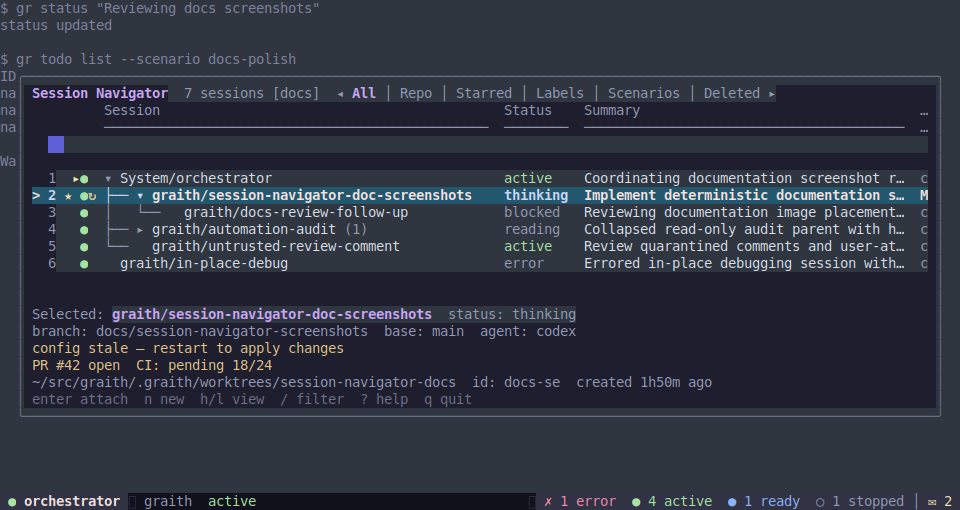
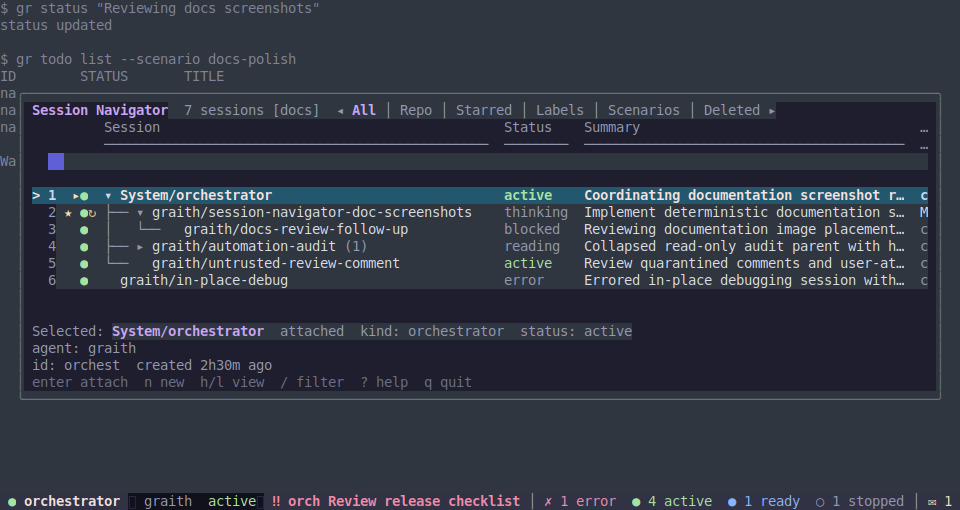
The Session Navigator is a full-screen TUI for browsing, managing, and attaching
to sessions. Open it with ctrl+b w, or run gr attach with no arguments.
Its footer shows a compact set of common actions; press ? for expanded help
inside the Navigator. If ? is configured for another Navigator action, use
F1 for expanded help. The visible footer actions and expanded help list are
configurable with [session_navigator.help].
Navigation
| Key | Action |
|---|---|
j / Down | Move cursor down |
k / Up | Move cursor up |
g / Home | Jump to top |
G / End | Jump to bottom |
h / Left | Previous view mode |
l / Right | Next view mode |
| Tab | Jump to the next group in grouped views |
| Enter | Attach to the highlighted session |
? / F1 | Toggle expanded Navigator help |
q / Esc / Ctrl-C | Close the Navigator |
View modes
Cycle with h/l or arrows:
| View | Description |
|---|---|
| All | Every session in one global parent/child tree; rows include repository names and preserve cross-repository edges |
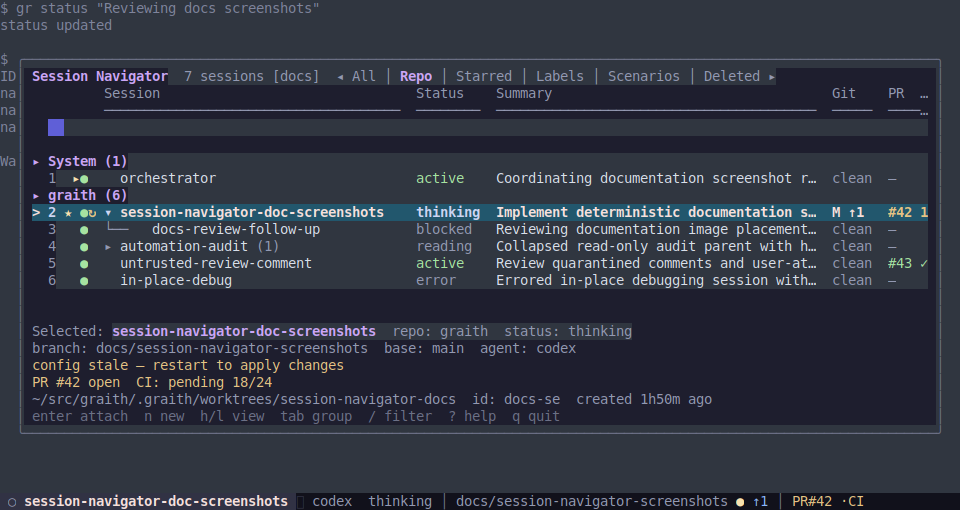
| Repo | Every session grouped by repository, with a separate tree in each group. Starred first, then running, then by name |
| Starred | Starred sessions in a parent/child tree |
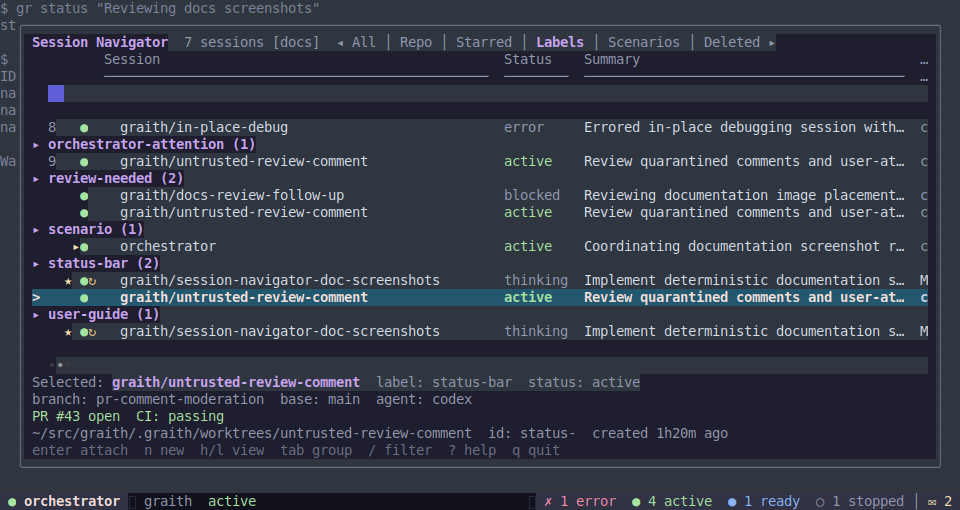
| Labels | Sessions grouped by label across all repositories, with a parent/child tree inside each label; a multi-labelled session appears in each matching group |
| Scenarios | Every session grouped by scenario, with a parent/child tree inside each scenario and unassigned sessions in a separate group |
| Deleted | Recently deleted sessions; press enter to restore the highlighted session |
Actions
| Key | Action |
|---|---|
n | Create a new session (opens a form with name, repo, agent, and optional comma-separated labels) |
x | Delete session (prompts for confirmation with y); sessions with descendants offer to soft-delete the entire subtree |
s | Toggle starred state |
r | Restart session (prompts for confirmation) |
R | Open the restart menu for all, outdated, or stopped sessions in the current view |
S | Stop the highlighted session (prompts for confirmation) |
| Space | Fold/unfold children of a parent session |
C | Fold/unfold all parent sessions |
/ | Enter filter mode (type to search by name, repo, or label) |
| Esc / Ctrl-C (in filter) | Clear filter and return to list |
Text search narrows the selected view, so searching while in Labels keeps the cross-repository label grouping. Refresh preserves the selected label group when the session still belongs to it. An empty Labels view says that there are no labelled sessions. Trees contain only sessions matched by the selected view and search: when a parent is absent, its visible child is shown as a root.
Reopening the Navigator during the same attach session remembers the last view and
selected session when they are still available. A new gr attach process starts
in All as usual.
The Navigator has no rename or label-edit action — use gr update from the CLI.
Preview
The Navigator keeps a live preview of the selected session’s terminal screen behind the management panel. The daemon maintains the screen model, and clients request snapshots while the session produces output.
On very wide terminals, the Navigator also shows a selected-session detail panel
beside the session tree with branch, worktree, labels, PR/CI/review state, and
lifecycle timestamps when that extra panel fits. Configure or disable it with
[session_navigator.selected_detail].
Session display
Each session row shows:
| Column | Content |
|---|---|
| Name | Session name (with star/current indicators if starred or attached) |
| Status | Running, stopped, errored, or agent status (active, ready, or error) |
| Summary | Status text, tool name from hooks, or auto-derived activity |
| Git | Branch name (or “(in-place)”), dirty indicator, unpushed commit count |
| PR | Pull request number plus CI or merge-conflict state |
| Review | Pull request review decision (a, c, or r) |
| Output | Age of most recent output |
Attention States
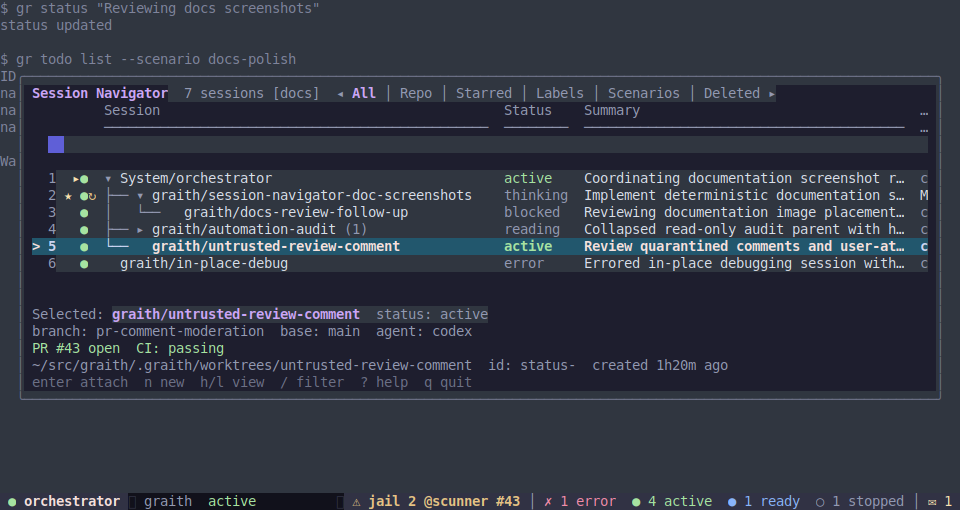
The status bar remains visible around Navigator screenshots, so user-attention signals are reviewed with the surrounding TUI rather than as isolated text.
Message viewer and scroll pager
The message viewer (ctrl+b m) and scrollback pager (ctrl+b [) share a
configurable navigation vocabulary and add their own action keys.
| TUI | Keys | Config keys |
|---|---|---|
| Message viewer | j/k older/newer message · pgdn/pgup scroll a long message · g/G first/latest · h/l conversation/topic · t topics · d direct messages · enter pin message or toggle topic namespace · O/C expand/collapse all messages · q/Esc/Ctrl-C close | tui.up/down, tui.page_down/page_up, tui.top/bottom, tui.message_prev_conversation/message_next_conversation, tui.message_topics/message_direct, tui.message_pin, tui.message_expand_all/message_collapse_all, tui.cancel |
| Scroll pager | g/G top/bottom · q/Esc/Ctrl-C quit (up/down/page keys are handled by the pager) | tui.top/bottom, tui.cancel |
Configuring TUI keys
The message viewer and scroll pager read navigation and cancel aliases from the
[keybindings.tui] config table. The Session Navigator reads only
tui.cancel from that table; its navigation keys are fixed, and its action
keys (delete_session, resume_session, and search) are the top-level
bindings. Each TUI-table value is a space-separated list of
Bubble Tea key names (single
letters, up, down, enter, esc, pgup, ctrl+d, …); any listed key
triggers the action. Navigator filter mode keeps Esc/Ctrl-C as the clear/cancel
keys so printable aliases can still be typed into the search field. A partial
table overrides only the actions it names, and a named action’s aliases replace
the default aliases for that action. See interface configuration
for the full list and defaults.
Terminal control sequences such as Kitty keyboard protocol, paste markers, mouse
reports, and viewport-owned pager navigation are not raw remappable keybindings.
Mouse-wheel reports can be mapped only through the typed gestures in
[input.bindings], such
as mouse_wheel_up = "scroll_mode". A mouse-opened scrollback pager exits back
to the live attach when wheel-down reaches the bottom; the prefix-opened pager
stays open until you quit it. macOS menu shortcuts use native Command-key
equivalents in the app; daemon config does not rewrite those platform
shortcuts.
macOS menu shortcuts
The macOS app keeps native menu key equivalents local to the app rather than loading them from daemon config.
| Shortcut | Action |
|---|---|
| Command-N | New session |
| Command-Shift-N | New window |
| Command-C / Command-V / Command-A | Copy, paste, select all in the focused terminal |
| Command-Shift-] / Command-Shift-[ | Next / previous session |
| Command-1 through Command-9 | Jump to the matching session position |
| Command-R | Refresh |
| Command-D | Split right / close split |
| Command-= / Command-Minus / Command-0 | Increase, decrease, reset terminal font size |
| Command-K | Clear the focused terminal |
| Command-F / Command-G / Command-Shift-G | Find, find next, find previous |
Shell
Press ctrl+b s to open an interactive shell in the current session’s worktree, as a child process with GRAITH_WORKTREE set to that path. On exit, the terminal resets (alternate screen buffer cleared, mouse tracking disabled, cursor shown) and you return to the agent session.